Adding a second model provider usually means a second API key, a second API format, and a second round of setup in every tool and agent that calls it. By the third provider, the wiring becomes its own project.
OpenMatter® built ModelRouter™ to put every model behind one address, send each request to the model that fits it, and keep provider keys out of your agents entirely. Below is how it works and how to set up your own gateway in the Datavizor™ console today.
Stay up to date as we build the infrastructure layer for secure AI collaboration:

OpenMatter is chairing the Decentralized AI Agent Alliance’s Agentic Privacy & Security subgroup. Our next meeting will be held on September 23, 2026, at 1 p.m. EDT, and every other Wednesday thereafter. Please join us.
If you’re curious what DAIAA is all about, you can watch the September 9 meeting to learn more.
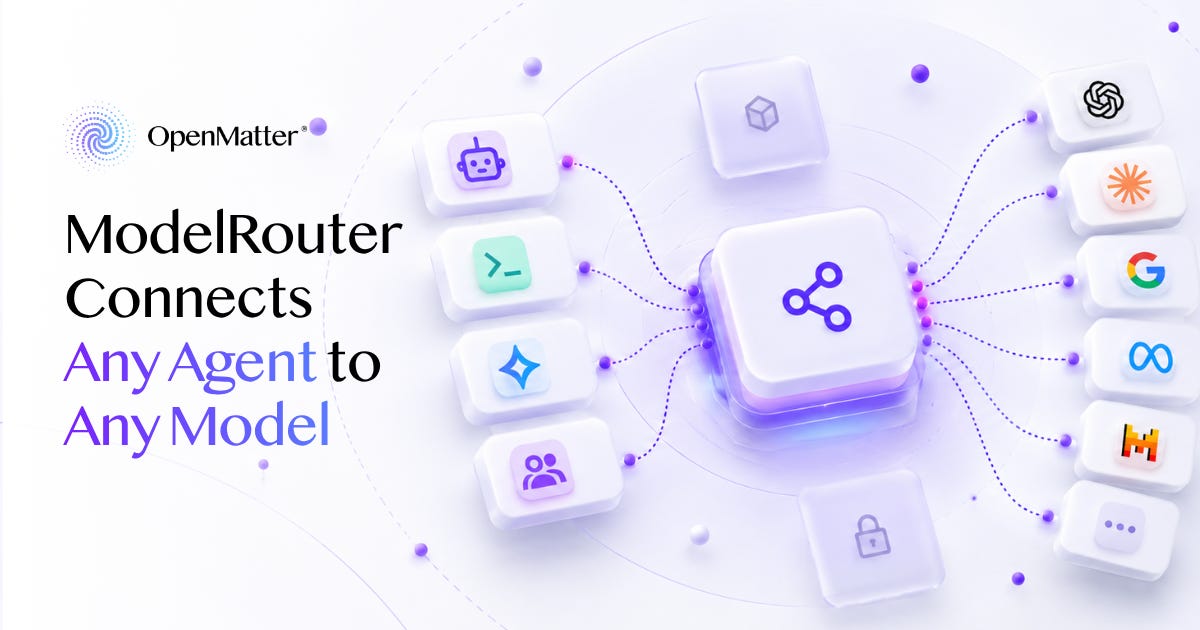
ModelRouter Connects Any Agent to Any Model
Datavizor Puts Every Model behind One Gateway You Control
Your agents should get the best model for every job, not the most expensive. With ModelRouter, they do.
One gateway connects your tools and agents to OpenAI, Anthropic, Google, OpenRouter, and open models on your own servers. Claude Code can run on a GPT model or on an open model you host yourself. You decide which model handles each prompt, and you can change that decision in the console without touching a line of code.
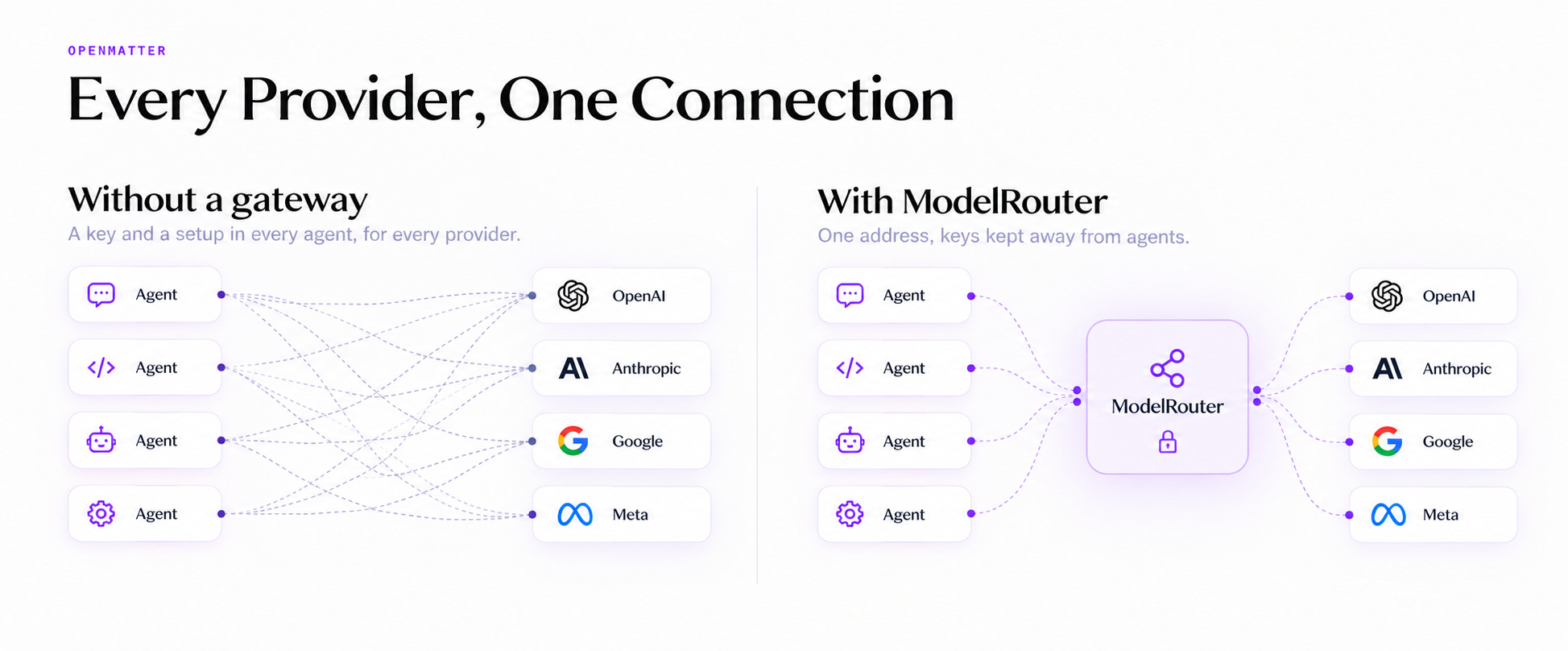
Your agents never hold a provider key to do any of it. The keys stay in one place. Every agent gets a single address and a token instead. That’s ModelRouter.
One Address, Every Model, Every Tool
ModelRouter is a gateway you deploy from the Datavizor console with one click. You connect it to the model services you use, which the console calls endpoints. It supports OpenAI, Anthropic, Google, and OpenRouter, plus model servers you run yourself on Ollama, vLLM, LM Studio, or llama.cpp.
Your tools and agents reach the gateway at one HTTPS address.
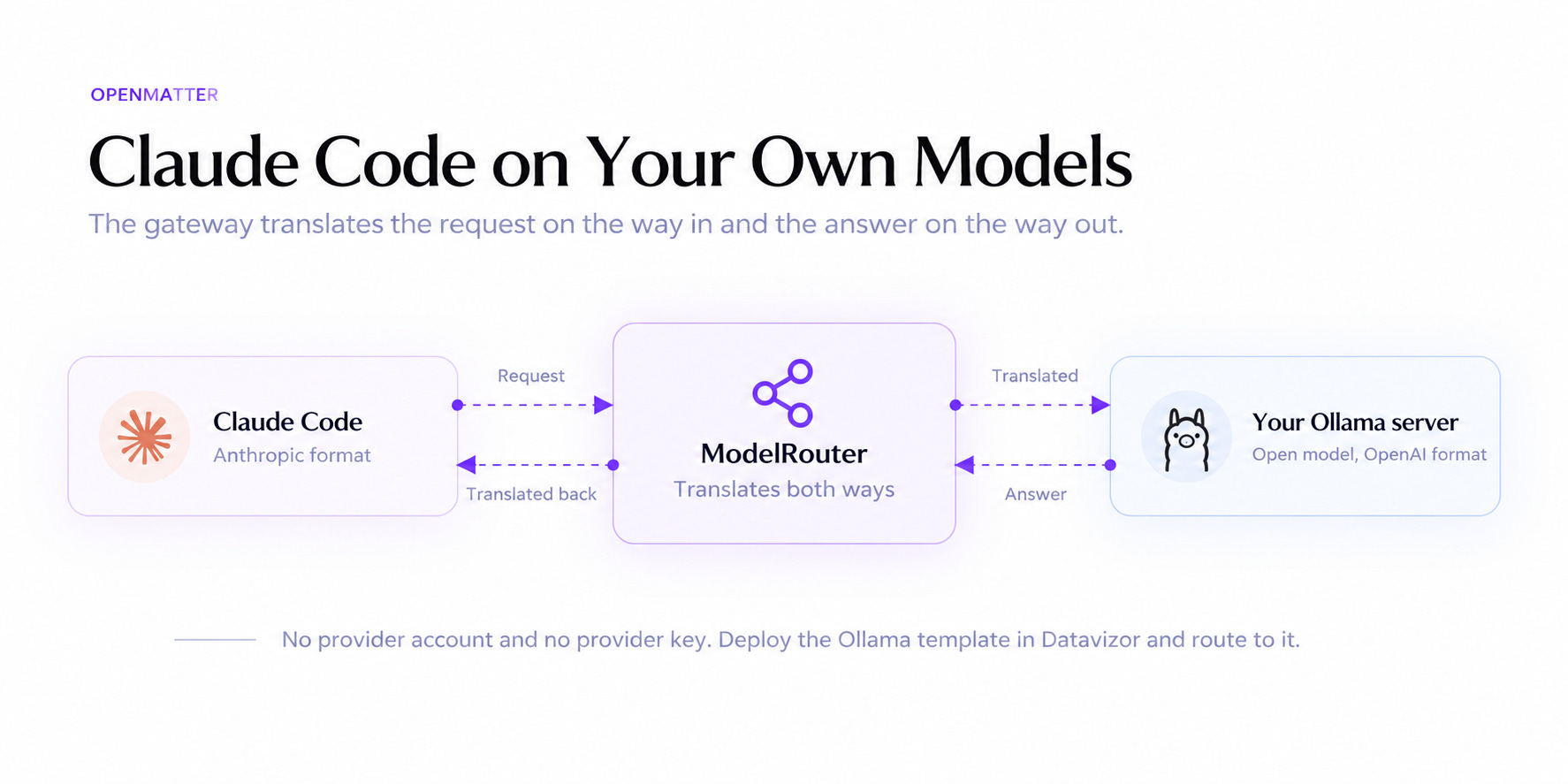
That address speaks both the OpenAI and the Anthropic API formats. If a request goes to a model that uses the other format, the gateway translates it, so a tool built for OpenAI can talk to Claude. If not, the request passes through untouched.
The Connect tab has setup steps for Claude Code, Cursor, OpenCode, VS Code Copilot, Cline, Zed, Aider, Codex CLI, and the SDKs. For Claude Code, you set two environment variables, plus an empty key that silences a startup warning:
export ANTHROPIC_BASE_URL="https://your-gateway-address"
export ANTHROPIC_AUTH_TOKEN="your-gateway-token"
export ANTHROPIC_API_KEY=""
Your tools ask for a model named openmatter/auto, and your routing rules decide which model answers. If you’d rather let each tool choose its own model, switch the flow to “Honour named models.”
Rules That Pick the Right Model for Every Prompt
Not every prompt needs your largest model. ModelRouter lets you decide which ones do.
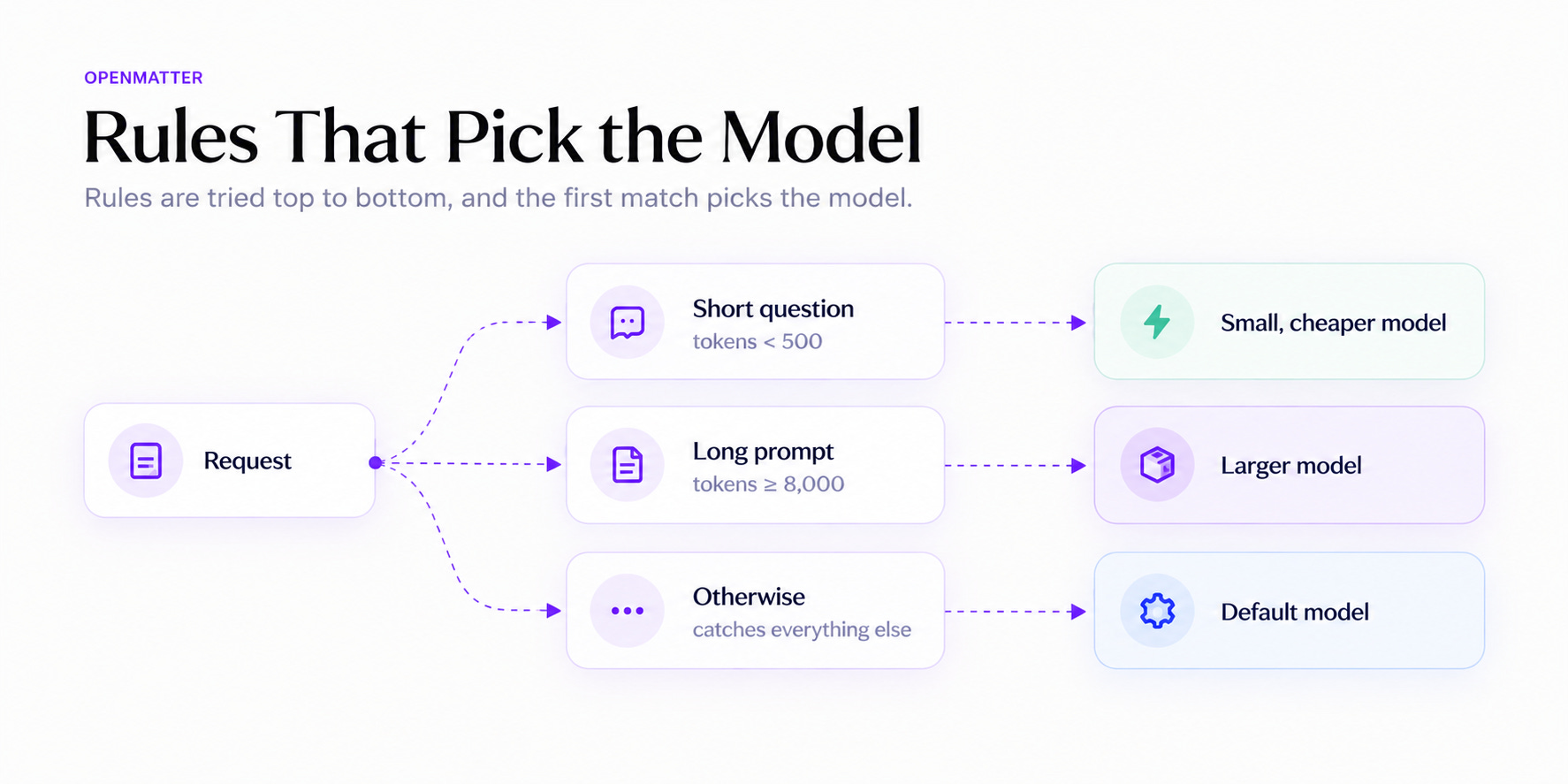
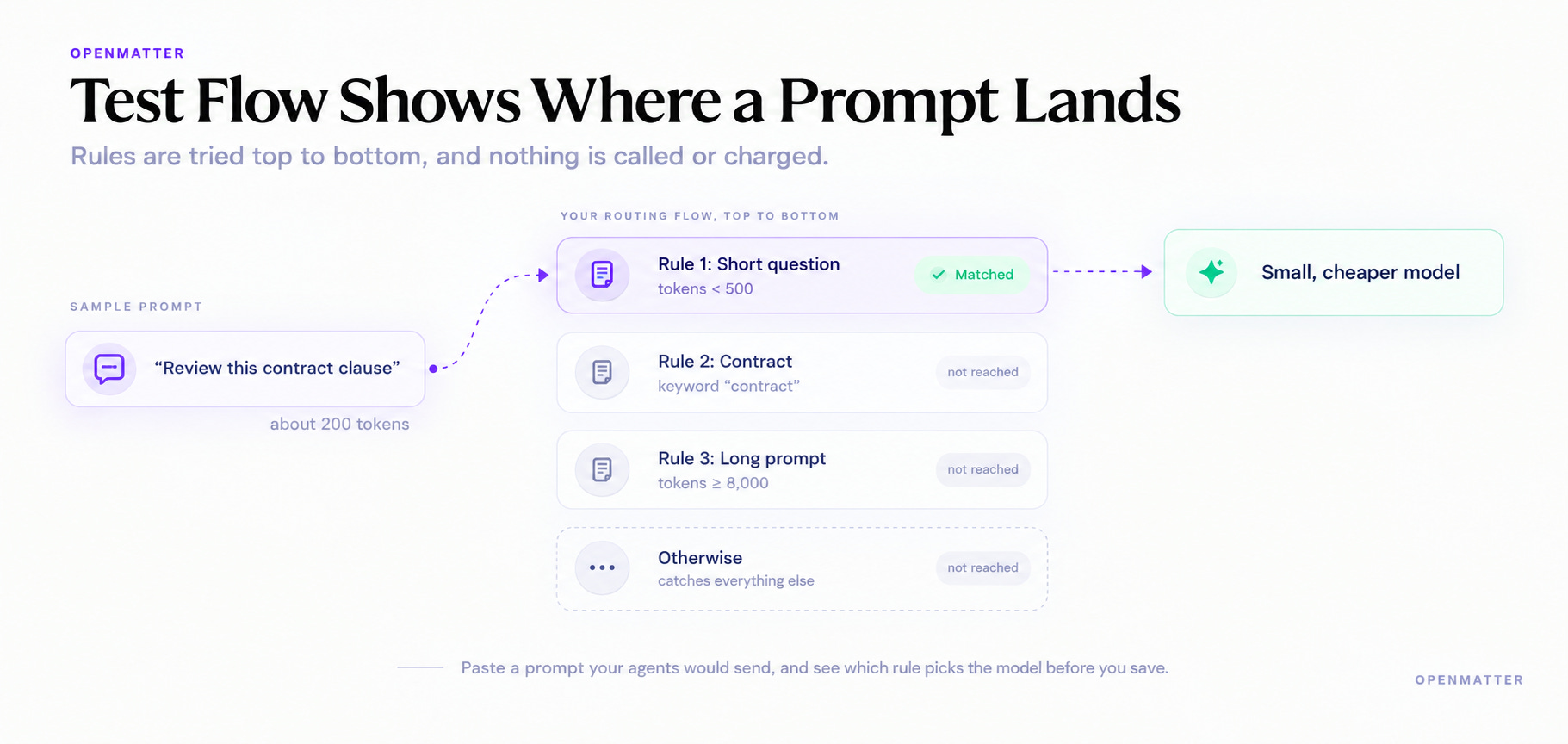
You set up routing as a list of rules, and the gateway tries them from the top. A rule can match keywords in the prompt or check the prompt’s estimated length. The last rule, “Otherwise,” catches everything the others miss. Rules written in plain language are on the way.
The starter flow shows how this works. Prompts under 500 tokens go to a small, less expensive model. Prompts of 8,000 tokens or more go to a larger one. Everything else goes to “Otherwise.” For each rule’s model, you can also set the temperature and cap the length of the reply.
The console draws the whole flow on a canvas, so anyone on your team can see where a prompt will go. You drag rules to reorder them, and the order matters. Say you add a rule that sends anything mentioning “contract” to a larger model. If the short-question rule sits above it, a 200-token prompt about a contract still goes to the small model. Drag the contract rule to the top, and it wins.
The Test flow button lets you catch mistakes like that. Paste in a prompt your agents would send, and the canvas highlights the path it takes, without calling a model or charging anything. A second button, “Run on gateway,” checks the same prompt against your live gateway, so you see its choice before your users do. Before you save, a Flow check panel points out rules that conflict.
When a better or cheaper model comes out, you switch to it by editing one rule. You don’t redeploy anything. The Overview tab tracks requests, tokens, and response time for each model, so you can see what every switch does.
Claude Code on Your Own Models, No Provider Key Required
You can try all of this without an account at any model provider.
First, deploy the Ollama template from Datavizor’s Deploy tab. Then pull a small model using the command the console gives you. Add that server to ModelRouter as a self-hosted endpoint, and point Claude Code at your gateway.
An open model on a server you deployed now answers Claude Code in the Anthropic format it expects, with the gateway translating in both directions.
Your Agents Never Hold a Key
The usual way to connect an agent to a model is to put the provider key in the agent’s environment. The agent can read it there, and so can everything the agent runs. Ten agents mean ten copies of the key.
Those copies spread. An agent that can read a key can also repeat it in its reasoning. Some models return an encrypted record of that reasoning, and developers often post session logs containing those records to public code repositories. In August, a team of eight researchers decoded 315,320 of those records and recovered 182 credentials.
ModelRouter keeps every provider key in one place. You add each key once, and your browser encrypts it before it leaves the page. The key is stored in MatterVault™, split among a committee of separate machines. No single machine holds enough to rebuild it.
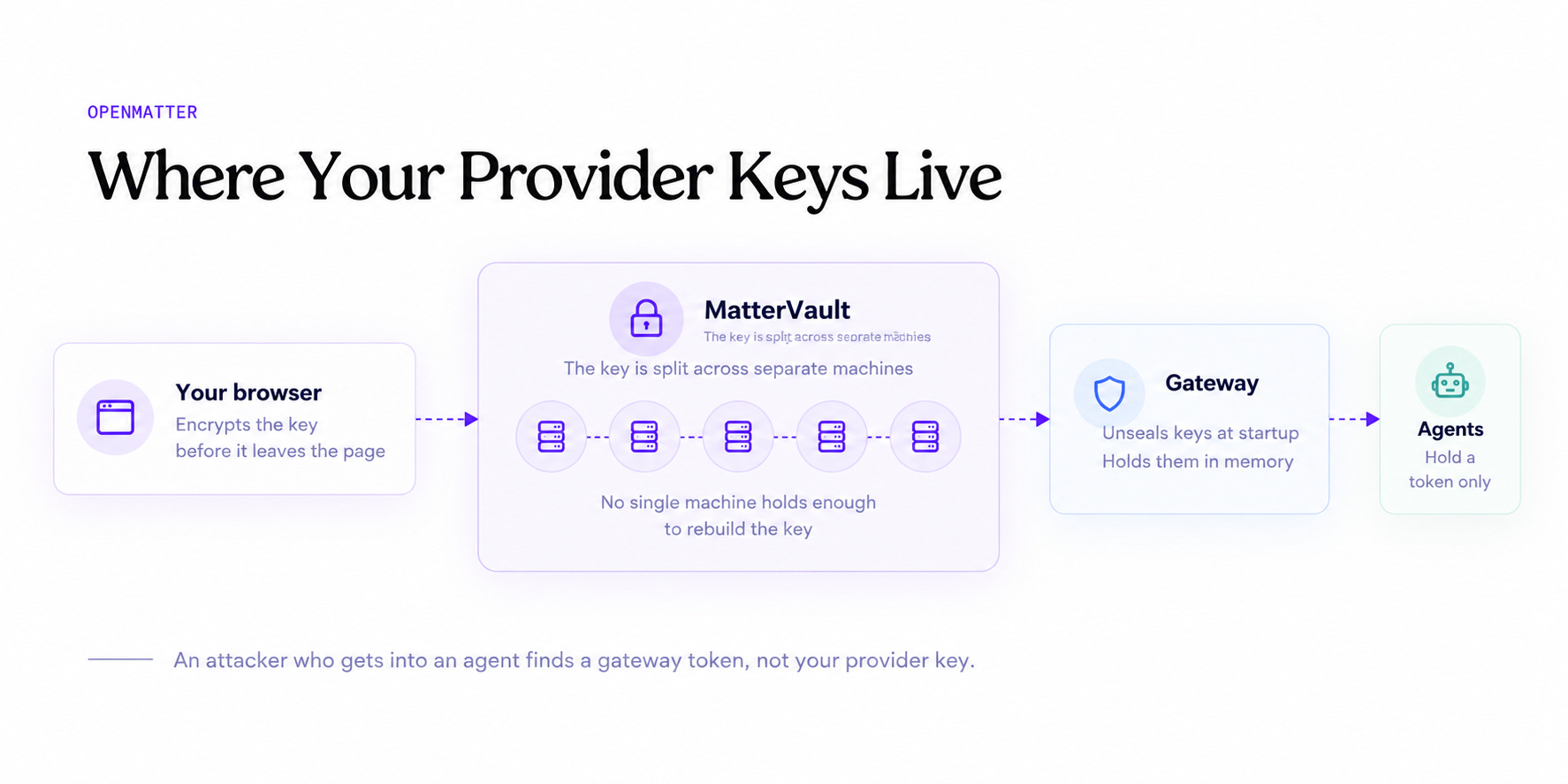
The gateway runs under its own account, which can read your keys and your routing rules but nothing else. It unseals your keys when it starts and holds them in memory. Your apps and agents get the gateway’s address and a gateway token instead. If an attacker gets into an agent, they find a token for your gateway, not the key to your provider account.
When you rotate a provider key, you change it in one place, and no app or agent needs an edit.
Try It in Datavizor
The ModelRouter page in the Datavizor console walks you through four steps:
Connect a model service. Add a provider key, or point to a model server you run.
Deploy the gateway.
Save a routing flow. The starter flow works as it is.
Send the gateway a request. The Connect tab gives you a curl command to test it before you point a tool at it.
You get one address for every model, the right model for every prompt, and no provider key in any agent you run.
ModelRouter is available now. Open Datavizor and deploy your gateway.
— The OpenMatter Team
If you know someone who would benefit from reading this article, please share it:
OpenMatter is building the verifiable trust layer that enables AI agents to securely collaborate on sensitive data sets. If you’re in a regulated industry and need a better way to prove that your data is secure, contact our team to learn how masked compute can help.